Your Ad Here

Easy wallpaper search

Filed under: by: The Geekie

Technology ! ! One demerit is with its advancement in day-to-day life , earlier inventions goes extinct.

I am still using 15 inch CRT which companies have stopped manufacturing. Because of introduction of higher sizes monitors and thats too 17 ,19 inch CRT or LCD.

What I say is that...for wallpaper we keep on desktop. We visit different wallpaper sites like...well.. there are many...I dont need to say about it.

Lower size monitors require wallpapers with smaller resolution.And similarly the bigger monitors.

For 15 inch screen - Best Resolution that fits is 1024 x 768 where 1024 is width ,768 is height
For 17 inch/19 inch - 1600 x 1200
This varies for different monitor sizes and same for laptops which have wide screens. The resolution can be found from manuals given by manufacturer or you can go directly Right click on Desktop>Properties>Settings tab .

Here is the tweak to search wallpaper in Google.

Open http://images.google.com

In searchbox type imagesize: x WHATTOSEARCH .

E.g : imagesize: 1024x768 birds produced results as shown below


This is why I say Google i god of internet.

So enjoy searching perfect wallpapers for your desktop.

Get email alerts on your mobile

Filed under: by: The Geekie

Sorry buddies for resuming to blogging so late......This is how recession made me upset :(

Anyways I am back with a new tech post.

With a hope that my readers are aware of Way2sms, India's popular free sms portal , I continue this post.

As I always say that web is gradually making our life easier by or other means.

I used to ask myself whether it is always required to go cafe and check my inbox for any new mails???? :O

Now Way2sms has introduced mail alerts option.Just create a new mail id @waysms.com . This account is linked to your cell phone. Once a mail drops in the your inbox, you get a sms from Way2sms with the subject as the sms content.

But most of us use Gmail service. No need to worry.Thanks to flexibility of Way2sms.

Follow these steps
1- Create an account in www.way2sms.com
2- Now you will get your mobile number linked with a mail id ,say, xxxxx@way2sms.com.
3- Open Gmail
4- Go to Settings->Forwarding . Select Forward a copy of incoming mail to xxxxx@way2sms.com and click Save
5- Login in Way2sms and Go to Settings -> Mails Alerts . Select Alert me whenever an email reaches my inbox. In time settings select All 7 days and Round the clock. Click Save and Activate

This the way it works

Mail reaches----->Gmail------>Forwarded to Way2sms mail -------> Mail alert to your mobile by sms

Note :- You need to renew in way2sms every week to continue the service.

So be in touch with your mails even if you are away from internet.
Hw z it ?????

Reverse Lookup Phone Number and get Geographical Location

Filed under: by: The Geekie

What is Reverse Lookup??
The way of tracing back a phone number to its location with help of technology and internet

So before proceeding first of all kudos to such technology :)

Got a missed call from unknown number???
Want to trace a prank call???

If answer to these questions is Yes then you are at right place.
There are both free and paid services available for reverse lookup.

I am sure you want free service, so following are the links to some sites.Check out.

International Numbering Plans offers phone to location and network information retrieval for landline and mobile phones across the world absolutely for free.

TP2Location lets users reverse lookup any Telephone Number to its geographical location.

If you are ready to spend some bucks (this is none of your business though :P ) , then there are paid services like

Cellphone Registry provides its members the easiest way to trace prank calls.Why paid???? Because they include Owner information,Carrier details,Address details,etc in phone report.

Start exploring and tracing your friend's number.

Cool Firefox Addon to Automatically Backup your Firefox Environment Online

Filed under: by: The Geekie

Got Firefox corrupted???
Lost all customizations,settings,saved passwords????
Frustrated???

Here is the solution

I have got a really nice Firefox addon FEBE - Firefox Environment Backup Extension.
It lets you backup your Firefox extensions, themes, bookmarks, preferences, passwords, cookies and just about everything else Firefox offers. It can even restore your entire profile to good state.

It automatically backup your browser data of choice to Box.Net free online storage service.

Download the addon here

"No To All" Functionality while copying files

Filed under: by: The Geekie

While copying a bunch of files from one location to another, Windows provides a handy "Yes To All" option to overwrite all files without prompting for each , but there exist no "No To All" option allowing copying of only the files that don’t already exist there, you will have to manually press “No” for every file to skip overwriting.

HACK==> Holding SHIFT and clicking the No button will act as "No To All" functionality and windows will not overwrite any file and won't bother you asking for each file.

Fetch Lyrics Automatically

Filed under: by: The Geekie

I wanna read the lyrics of song being played!!!!!
This was a request of one of my blog readers

This post is tailored for music fans. Some of the free plugins available in net are :-

MiniLyrics
This plugin automatically downloads and displays lyrics of currently playing songs.
It supports almost every music players from Itunes, WMP, Winamp to KMPlayer and MediaMonkey.With skinnable interface matching your prefered music player , it plays lyrics in karaoke style.It displays line-by-line playback of lyrics in time with the song.If the lyrics is not available, then you can create your own time-synchronized lyrics and upload it to server too.


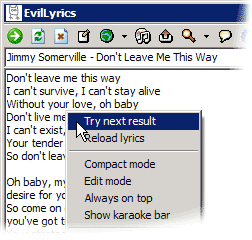
EvilLyrics
It is another free lyrics fetcher designed for most popular players.In addition to playing the lyircs of song , it also supports a cool karaoke mode.

Inspite of lacking pretty interface,still it works well giving the user a digital music experience .


Lyrics Plugin
It is another alternative to view lyrics in WinAmp or Windows Media Player only. No more searching for lyrics. Just start listening to your favourite songs and lyrics will be displayed automatically.If lyrics is not found, you can add it yourself :)

Thanksgiving 2008

Filed under: by: The Geekie

There are lots of freebies available on net.We just need to order them.They are delivered to your address absolutely for free.
I have found some genuine ones that worked for me.So hurry up !!!

Google SMS

Filed under: , by: The Geekie

Why Google SMS??
* Works for any phone (atleast with sms enabled) and from any GSM/CDMA network
* Works all over the world
* No premium charges ,only standard charges for sending sms
* Immediate results of your querry

With Google SMS , you get what you want.
Just send your search query by SMS to 9773300000 and you receive results back by SMS immediately.
Save it
Example :
To get PNR status, just sms your PNR number to  9773300000
You can also get local lodge details,train schedules,business news, stocks quotes,weather,etc etc and everything.

Have a try out in their Interactive demo
Check out the power of Google Sms

Google Talk Tips and Tricks

Filed under: , by: The Geekie


With Google talk getting popular messenger these days, I would like to share some tricks ...the unsaid extra features.

Insert breaks - If you want to have multiple paragraphs in a message, hold shift and hit enter. Now you can add as many new lines as you want to create.

Format text - You can make text either bold or italic by surrounding it with * or _.
Example: _hello_ = hello
*hello* = hello

Font size - Hold the control key, move the scroll wheel on your mouse either up or down. But it only works in write are :(

Switch windows
- Hitting tab will cycle through open chat windows. Hit enter to expand the window.Cycling again to another window collapses the expanded one.

Innovative Buzz - You must be aware of 'Buzz' option in yahoo messenger. Gtalk doesnot have such feature. Just give a missed call in gtalk . Call a user and End the call immediately. It acts like Buzz :P .

Remove RECYCLER virus from removable media

Filed under: by: The Geekie

1. Open your Windows Task Manager click Processes Tab
2. Locate CTFMON.EXE select it and click End Task
3. Open your startup menu then locate the CTFMON.EXE and delete it
4. Search it (CTFMON.EXE) using your search tool which is usually resides in the Startup menu not in your %sysdir%\system32 folder then delete it.
5. click start->run and type cmd then go to your root directory by issuing the command cd\
6. type attrib -r -s -h +a *.inf then erase the autorun.inf(del autorun.inf)
7. type attrib -r -s -h +a recycler then erase the content (cd recycler -> del *.* ->Y -> cd..) and remove the recycled folder (rmdir recycled).
8. Repeat no. 5 to 7 to all your existing drive including your usb.

Gmail now with Voice and Video chat

Filed under: , by: The Geekie

Google has introduced new facilities in its free email service. Recently it has activated voice and video channels for users in Gmail chat. To avail these facilities ,user needs microphone or webcam and is required to install a plugin.Download here

After installing the plugin, to start video chat, just click on the "Video & more" menu at the bottom of your Gmail chat window, and choose "Start video chat." Then you'll see and hear your friend live, right inside Gmail. You can click the "pop-out" icon to make the video larger, or click the fullscreen icon in the upper left-hand corner.

Two more blogs started

Filed under: by: The Geekie

Blog on Investing Education
Learn about finance and business terms with me
http://invest123.blog.co.in/

Blog that contains funny mails forwarded to me by my friends
http://theinbox.weebly.com/

Send free SMS through Gtalk

Filed under: , by: The Geekie

Chikka Asia, Inc. is world's first instant messenger with integrated SMS feature with more than 38 million registered users.

Chikka creates an unified account with this mobile number . As per Chikka's policies, after 3 SMS are delivered recipient has to reply else further SMS will not be delivered. Though I have not tried, remove and re-add recipient's mobile number and check whether SMS are delivered or not. Recipient can reply either through SMS (paid) or logging into Chikka messenger (free).

To send SMS through Gtalk
Add CountryCodeMobileNumber@chikkatalk.com
to your Gtalk contacts and send message.

e.g.
For India add 91xxxxxxxxxx@chikkatalk.com in Gtalk


Keep in touch with your friends by sending free SMS wherever they are.

Photofunia- Create funny effects

Filed under: by: The Geekie

Tired of working in Photoshop????
No knowledge about morphing???

Here is a site that allow you to apply funny effects on your images with a couple clicks and with no need to know any basic of the image editing. Isn't it amazing ??
It is an online image editing tool that gives users a fun filled experience by creating realistic photos. Some of the effects work on face detection technology. It allows you to save the final image to be downloaded to your PC or uploaded to an image host Imageshack.

www.photofunia.com

Google Talk Hidden Smileys

Filed under: , by: The Geekie

The list of hidden smileys for Google Talk or Gmail Chat is now revealed here .

Just type these in your chat box and press enter.In gmail, move your mouse to entered smiley to reanimate it.

Have fun in chating with friends using smileys.

Free Microsoft Windows Home Server

Filed under: by: The Geekie

Order a free Microsoft Windows Home Server Evaluation Kit with free shipping.Remember to order a single kit because the site tracks your IP address in processing your order.Hurry friends.
Click the link below

Independence Day Special

Filed under: by: The Geekie


RSS for Dummies

Filed under: by: The Geekie

What is RSS? Every time I spent time on web I used to see RSS in almost every page on internet. But I never gave importance to it because I did not know what it was. It was just 4 days back I researched on this topic and explored a bit about it. It’s really a very fantastic technology used by millions of web users. So I thought it would be very nice to share with you all about this.
It helps us to keep track of updates of our frequently visited websites or blogs. With this technology we don’t need to visit a website every time to check if any new content is added or not.
RSS stands for Really Simple Syndication / Rich Site Summary. Basically it’s a format used to provide users with frequently updated content. It is also called a ‘feed’.

How to use RSS? To get RSS content from a website we need a software(also called aggregator or feed reader or RSS reader).Some of well known softwares used for this are Feed Reader(desktop based), Feed Demon(desktop based) ,Google reader(web based),etc. These days popular browsers come with inbuilt RSS readers.
For desktop based feed readers, what you need is to copy and paste the feed link into it. Here is the image of commonly used RSS icons on web.

Same thing in case of Google reader too. Its really fun exploring with feeds. Try it.
In case of Firefox, whenever you visit a website you get a RSS icon in the address bar. Just click it to subscribe. If you don’t get it, then click on ‘Subscribe to ..’ on that current webpage- this leads you to the feeds. A sample of my blogsite RSS is shown below.
Then you get an option to save in bookmark. Simply create a new folder for Feeds in it and save in it. You can try this in any website. It is useful in getting news all over the world through feeds.So experiment it in CNN,TOI, IMDB websites.

Hope you liked this post. Incase you face any problems in using RSS then contact me.I am there for you.

My Gtalk 4 U

Filed under: , by: The Geekie

Notepad Trick--Make your Notepad a diary

Filed under: by: The Geekie

Sometimes we want to insert current data and time, whenever we open the file in the notepad. It can be done in two ways.

First way=>> Just press F5 whenever you open a notepad.
Geek way=>>Just add a .LOG in the first line of your text file and close it. Next time you open the file it will insert the current date and time at the end of the file. You can start entering your text after that.

How did you like the tweak???

Blogging Blogs - BlogCatalog Blog Directory Add to Technorati Favorites Technology blogs Add to Google Blog Flux Directory tracker

Kontera Tag